

Creating Custom Form Cards in SharePoint for Enhanced Task and Employee Management
Setting up custom form cards in SharePoint can revolutionize how organizations handle task management, employee tracking, and human resources processes. By utilizing the Custom Cards Template available at SharePointDashboards.com, businesses can create sophisticated forms that allow for inline editing, thereby simplifying data entry and update processes. This article explores how you can implement this system effectively and its benefits across different operational domains.
The Importance of Custom Form Cards in SharePoint
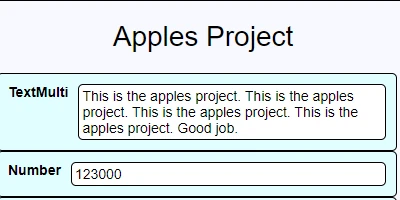
Custom form cards present a flexible approach to interaction with SharePoint lists by utilizing a simple copy-and-paste template system. Especially in environments where task management and employee tracking are essential, customizable forms enable teams to quickly adjust information presentation without complex coding. Fields can span multiple columns, allowing for better visibility of crucial information such as multiline text. For example, a field named "Status" can be converted to span two columns by naming it "2CWStatus," ensuring detailed information can be displayed clearly.
Integrating with Charting and Visual Status Indicators
Custom form cards work well with SharePoint's charting and visual status indicators. These cards provide an intuitive mechanism to track progress in real-time via visual signals, thereby enhancing task management. Managers can quickly assess project milestones or employee performance metrics by looking at the easily updated and readable information presented by custom cards.
Streamlining Task and Employee Management
For task management, structured form cards in SharePoint provide substantial advantages. Employees can update task statuses directly within the card, ensuring real-time feedback and status updates. Inline editing can be limited, as fields such as image and calculated fields are non-editable from the card. Multiline text fields are editable only in simple text mode, making quick text-based updates far more manageable.
Enhancing Human Resource Processes
Human Resources (HR) departments can deploy these custom form cards to track employee data efficiently. Using SharePoint lists with custom cards allows HR teams to manage employee records seamlessly while ensuring the data's accuracy and accessibility. The custom fields can span multiple columns, making it easier to track complex information like performance reviews or personal information. Importantly, implementation does not demand extensive IT intervention, which can expedite the setup and application within HR frameworks.
Setting Up in SharePoint with SharePointDashboards.com
The setup process through SharePointDashboards.com is straightforward with its template-based system. You simply copy and paste the template into your SharePoint setup, with designated fields such as "Close Redirect" URL, enabling simpler navigation. This URL can guide users editing cards back to the standard list view, and it is recommended to direct users to the "All Items" default list view. By employing the Card Link Template in conjunction with the custom card, seamless transitions between list and card views are facilitated, providing enhanced flexibility.
SharePoint JSON Formatting
SharePoint JSON formatting is essential when applying visual enhancements or customizations to your lists. By using templates to apply JSON formatting, users can swiftly transform SharePoint list views into interactive dashboards. The customization enhances how data is presented and interacted with on SharePoint, which is crucial in scenarios requiring significant data visualization or quick reference checks.
Use Case Scenarios
Consider a project management team tasked with a complex initiative involving multiple stakeholders and tasks. A custom form card setup allows these teams to adjust task details quickly, align resources, and update milestones within SharePoint without opening multiple applications or lists concurrently.
In the HR context, suppose a company wants to track employee training sessions across various departments. Custom form cards can house relevant training data, allowing HR managers to filter and view employee training status swiftly, keeping everything organized and up-to-date.
Conclusion
Employing custom form cards in SharePoint is a transformative step for organizations looking to enhance their task management, employee tracking, and HR operations. The integration with existing charting and status indicators streamlines project tracking and personal management systems, ensuring efficiency and accuracy. With simple setup guidelines from SharePointDashboards.com, any organization can leverage these cards to better visualize, manage, and execute their operations in the digital workspace.